conkw documentation - LmSensorsGrabber
This is the lm-sensors grabber. It will execute sensors -u every second and expose all of the metrics seen in the output of the program.
As a result, it only works on Linux and other OSes where this program exists.
- Full name:
net.pieroxy.conkw.webapp.grabbers.LmSensorsGrabber - Default instance name:
lmsensors
Use cases
- You want to monitor the fan speeds, voltages and temperatures of the computer.
Configuration
{
    "implementation":"net.pieroxy.conkw.webapp.grabbers.LmSensorsGrabber",
    "config": {
      "include":[".*_input"]
    },
    "namedParameters": {
    }
}
includeis an include list, a list of regexps against metric names. LmSensorsGrabber will only extract values from those metrics whose name match one of those regexp. Given that the output can be pretty numerous, this can save considerable bandwidth, cpu and memory, especially given that metrics like_critand_maxare often not properly filled in and thus report garbage or zero.
Metrics
Here is a sample output of the command sensors -u:
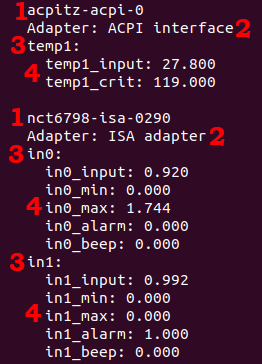
Where:
- 1: represents the chipset ID
- 2: represents the chipset name
- 3: Represents the sensor in the chipset
- 4: Represents the metrics attached to the sensor and its current value. Many of these values are configuration and one is the actual value read by the sensor. It is usually named
*_input. Those names will be called "basic metric name" further on.
Bare metrics values
This grabber will concatenate the chip ID, the sensor and the basic metric names to make one name that is pretty hard to make sense of. It will also replace any comma in this name with a dot. So, for the output of sensors -u above, the following metrics will be generated:
num.acpitz-acpi-0_temp1_temp1_input: 27.800,
num.acpitz-acpi-0_temp1_temp1_crit: 119.000,
num.nct6798-isa-0290_in0_in0_input: 0.920,
num.nct6798-isa-0290_in0_in0_min: 0.000,
num.nct6798-isa-0290_in0_in0_max: 1.744,
num.nct6798-isa-0290_in0_in0_alarm: 0.000,
num.nct6798-isa-0290_in0_in0_beep: 0.000,
num.nct6798-isa-0290_in1_in1_input: 0.992,
num.nct6798-isa-0290_in1_in1_min: 0.000,
num.nct6798-isa-0290_in1_in1_max: 0.000,
num.nct6798-isa-0290_in1_in1_alarm: 1.000,
num.nct6798-isa-0290_in1_in1_beep: 0.000
Groups
In addition to these metrics, some string metrics are generated to try to make lists. In order to do so I created the concept of a category of metrics. The category is the basic metric name, stripped of its numbers. So, for the example above, there are the following categories: temp_input, temp_crit, in_input, in_min, in_max, in_alarm, in_beep
Those categories will have for value a comma separated list of metric names in this category. So, with the example above:
str.temp_input: "acpitz-acpi-0_temp1_temp1_input",
str.temp_crit: "acpitz-acpi-0_temp1_temp1_crit",
str.in_input: "nct6798-isa-0290_in0_in0_input,nct6798-isa-0290_in1_in1_input",
str.in_min: "nct6798-isa-0290_in0_in0_min,nct6798-isa-0290_in1_in1_min",
str.in_max: "nct6798-isa-0290_in0_in0_max,nct6798-isa-0290_in1_in1_max",
str.in_alarm: "nct6798-isa-0290_in0_in0_alarm,nct6798-isa-0290_in1_in1_alarm",
str.in_beep: "nct6798-isa-0290_in1_in1_input,nct6798-isa-0290_in1_in1_beep",
Every metric in these lists will apear in the order it appears in the output of the sensors -u command.
Mins and Maxes
Last, the grabber automatically computes minimums and maximums of the values observed. So, for every metric generated, for example num.acpitz-acpi-0_temp1_temp1_crit there will be a num.min$acpitz-acpi-0_temp1_temp1_crit and a num.max$acpitz-acpi-0_temp1_temp1_crit metrics automatically generated.
Those values are recomputed after each run of the grabber, and the maxes and mins will evolve over time as the value of the metric goes over the maximum or under the minimum.
Units
There are no guarantee for this, but I have observed that the unit of the metrics can be deduced from their category:
temp_metrics are temperatures in °Cin_metrics are voltages in voltsfan_metrics are rotations per minutes (or RPM).- The rest is less clear to me as of now.
Recommendation
I do not recommend to display every metric as they are displayed in the default UI. Instead, use the default UI (or the command line program) to figure out which metric you want, and then add them manually to your custom UI.